Altering large tables on Laravel Vapor
I recently stumbled upon a peculiar issue with Laravel Vapor where I was getting collisions with index names when running database migrations on deploy and wanted to share how to get around this.
I recently stumbled upon a peculiar issue with Laravel Vapor where I was getting collisions with index names during database migrations on deploy and wanted to share how to work through this.
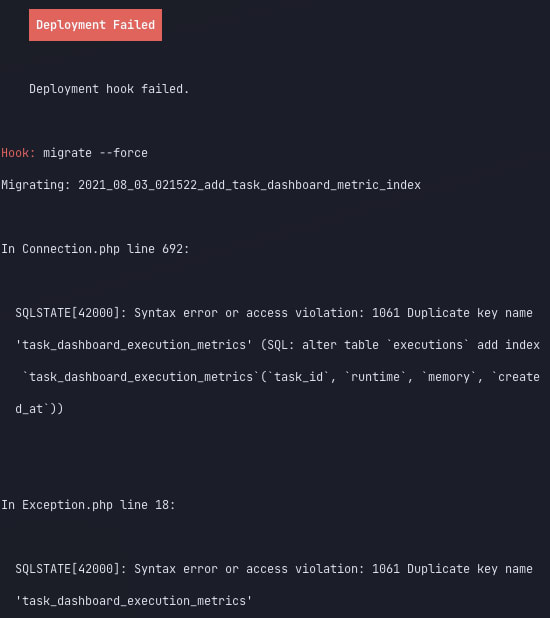
The problem
My first instinct was "oh, I was testing this migration out against the database directly to make sure it was doing what I needed it to, so I need to first drop the index and try again"
The trouble was that it didn't fix the problem.
As it turns out, Vapor deploys are subject to the same timeout limitations that your CLI lambda is bound by. This means for operations on large tables (or any long-running deploy hook), a timeout is reached and the deploy will fail.
The migration, however, continued to run and completed against the database, so the index already existed on a subsequent attempt, resulting in the same error.
The solution
First, you'll want to get the migration you need to run, assuming it hasn't already been run locally.
php artisan migrate --pretend
This will generate the queries Laravel would run, along with the migration key, which we'll need to prevent subsequent deploys from attempting the sane migration again.
2021_08_03_021522_add_task_dashboard_metric_index: alter table `executions` add index `task_dashboard_execution_metrics`(`task_id`, `runtime`, `memory`, `created_at`)
2021_08_03_021522_add_task_dashboard_metric_index: alter table `executions` drop index `executions_task_id_created_at_index`
Now, connect to your target (production) database server (using the command line, vapor database:shell, TablePlus, etc.) and identify the next batch value for your migrations table:
select
  max(`batch`) + 1 as `new_batch`
from
  `migrations`; -- 2
Then, run the database migrations generated by the migrate --pretend command.
Lastly, you'll need to add an entry to the migrations table for each migration key to prevent future calls to migrate from running the sane migration again.
insert into `migrations` (`migration`, `batch`) values
  ('2021_08_03_021522_add_task_dashboard_metric_index', 2); -- The value from the `new_batch` query above
Now your Vapor deploy should proceed as expected, given the migrate command will see that there are no migrations to be executed.
Considerations
Now, in this instance I was adding an index to an existing (large) table, so this approach made sense.
If you are carrying out destructive operations against an active deployment, you will need to be considerate of your approach to ensure your application doesn't start raising errors mid-change.
You may need to use a multi-step add, deploy, remove approach in these scenarios.
Conclusion
Whilst this is a manual process, the outcome is the same as running artisan migrate as part of your deploy process.
Running and recording migrations manually is going to be fairly standard as your application database continues to grow, allowing for greater flexibility to tackle longer-running migrations that would otherwise timeout running via Lambda with PHP
As an aside, the index I had to add took a page from... reaching an execution timeout to loading in < 1sec, so I'm pretty happy with that covering index 👍🏻
Written by Michael Dyrynda
Principal Engineer, Laravel enthusiast, and open source contributor. I write about web development, PHP, and the problems I solve along the way.